

Most businesses no longer struggle to access AI. They struggle to make it work inside daily operations. Many teams adopt AI tools one at a time, with no connection between them. Meanwhile, leads still get copied by hand, reports still take hours, and follow-ups still slip.
The real value of AI workflow automation is not another tool. It is a connected system where apps, data, and intelligent decisions work together.
McKinsey’sState of AI research agrees. The companies seeing the biggest returns are redesigning workflows, not just adding software.
That shift transforms how a business runs. Scattered tasks become AI-powered workflows that save time, reduce errors, and scale with demand.
Below, you’ll see how business automation works, which services deliver smarter operations, and what they cost.
What Is AI Workflow Automation?
AI workflow automation is the use of artificial intelligence to run multi-step business tasks with little manual effort. It follows rules like classic automation, but it can also read, sort, and decide.
In simple terms, it turns repeat work into a system that runs on its own. An incoming email gets read, sorted by intent, and routed to the right person.
For most owners, using AI to streamline business workflows pays off first in time saved. Repeat tasks stop eating their week, and results show up quickly.
How AI Workflow Automation Works
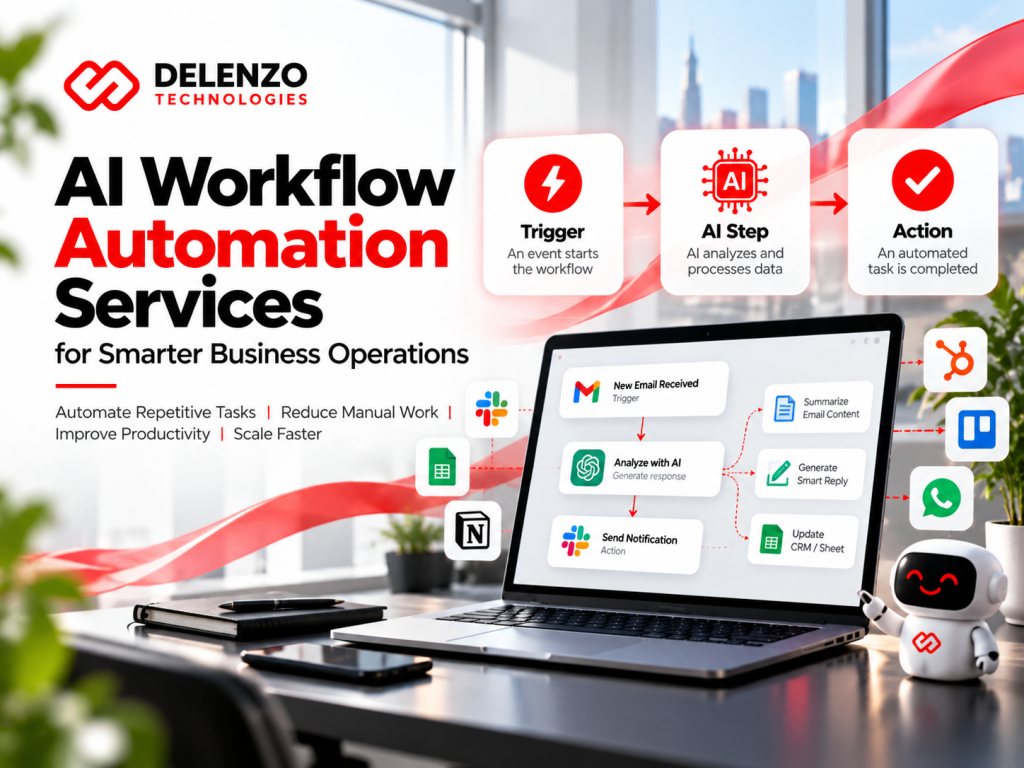
Every AI workflow has three parts: a trigger, an AI decision step, and one or more actions.
- Trigger: A form fill, a paid order, or a set time starts the workflow.
- AI step: A model reads the data, then sorts it, sums it up, or writes a reply.
- Action: The system updates your CRM, sends a message, or creates a task.
Picture a prospect filling out your contact form at 11 p.m. The AI scores the lead, drafts a personal reply, and offers a booking link.
Chain enough of these small steps, and you get AI workflows that cover a whole process. Those automated workflows run around the clock without anyone pressing a button.
AI Workflow Automation vs Traditional Automation
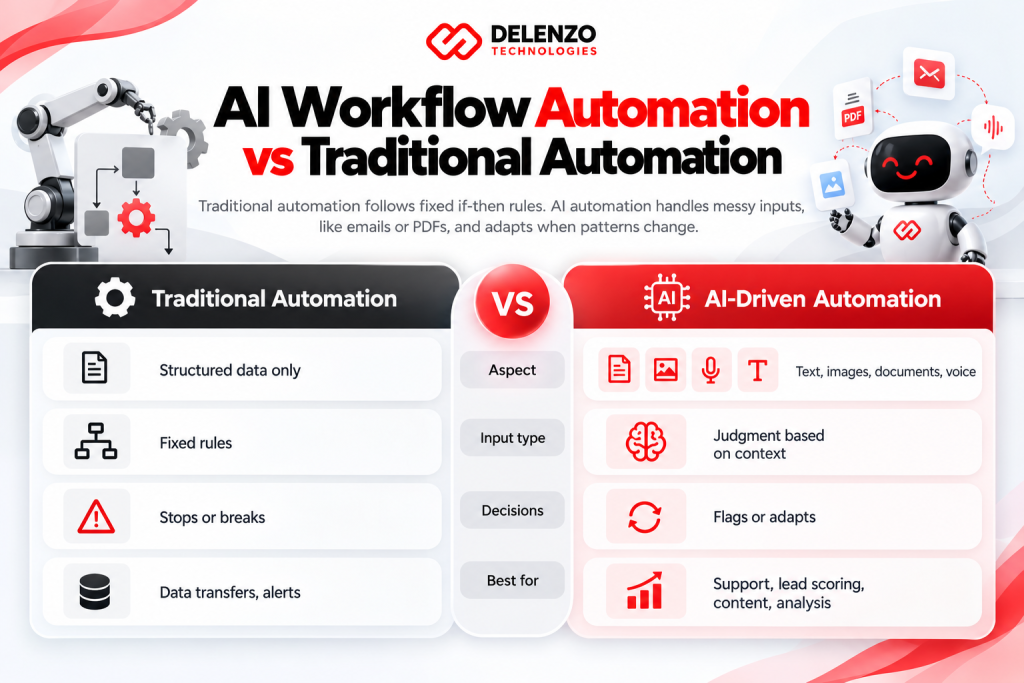
Traditional automation follows fixed if-then rules. AI automation handles messy inputs, like emails or PDFs, and adapts when patterns change.
| Aspect | Traditional Automation | AI-Driven Automation |
| Input type | Structured data only | Text, images, documents, voice |
| Decisions | Fixed rules | Judgment based on context |
| Exceptions | Stops or breaks | Flags or adapts |
| Best for | Data transfers, alerts | Support, lead scoring, content, analysis |
In short, traditional automation moves data while AI automation understands it. Most strong setups use both together.
That’s why workflow automation AI works best as an upgrade, not a replacement. Keep your simple rules. Add AI where judgment is needed.
Our AI Workflow Automation Services
Delenzo Technologies offers AI workflow automation services that cover design, development, integration, and ongoing support. Each build starts with how your team works today, not a template.
Each service below targets a different part of your business.
Custom AI Workflow Design and Development
Custom workflow design means building automation around how your business already runs. Off-the-shelf tools rarely fit every step of yours.
We map your process, pick the right platform, and build with an AI workflow builder like n8n, Make, or Zapier. When those tools hit their limits, we write custom code.
Every workflow includes clear logs. You can see what ran, when it ran, and what the AI decided.
Business Process Automation
Business process automation removes repeat steps from daily work like approvals, onboarding, and invoicing.
With AI process automation, those steps go further. The system can read an invoice, match it to a purchase order, and flag mismatches.
- Employee onboarding checklists and account setup
- Invoice intake and approval routing
- Vendor and contract document review
- Internal requests handled through Slack or Teams
AI Agent Development and Automation
AI agents are programs that complete goals across several steps, not single tasks. They can research, decide, and act within limits you set.
AI agent workflow automation fits jobs with many small choices. Examples include qualifying leads, researching prospects, and handling basic support tickets.
Every agent we build has guardrails. People approve sensitive actions, like refunds or contract changes, before anything happens.
Sales and CRM Workflow Automation
Sales automation keeps your pipeline moving without reps chasing every update by hand. Our team connects AI business automation tools to HubSpot, Salesforce, Pipedrive, or GoHighLevel. The system then logs calls, updates deal stages, and drafts follow-ups.
It can also flag deals that have gone quiet for a week. Managers get a short pipeline summary every Friday instead of chasing reps for updates.
Your reps spend more time selling and less time typing notes into the CRM.
Marketing and Content Automation
Marketing automation handles the repeat parts of content and campaigns, so your team can focus on strategy.
Agencies and in-house teams often look for content agency workflow automation tools to manage briefs, drafts, approvals, and publishing. Our team builds that pipeline from start to finish.
AI can draft social captions, repurpose blogs, and tag assets. A human editor still reviews everything before it goes out.
Customer Support and Email Automation
Support automation answers common questions instantly and sends complex issues to the right person.
Smart AI automation workflows read each ticket, spot intent and urgency, and suggest a reply. Simple questions like order status get answered in seconds.
- Inbox sorting and labeling
- Draft replies for agent approval
- Order status and common question answers
- Instant alerts for urgent or upset customers
Data Processing and Reporting Automation
Data automation pulls numbers from many sources into one clean, current view. Using data workflow tools, we sync Google Analytics, ad platforms, your store, and your CRM. AI then writes a plain-English summary of what changed, so Monday mornings no longer start with spreadsheets.
Benefits of AI Workflow Automation for Businesses
The main benefits are lower costs, faster work, fewer errors, and room to grow without hiring at the same pace. AI-powered workflow automation pays off most when it targets high-volume, repetitive tasks. Each benefit below shows where those gains appear.
Reduce Manual Tasks and Operational Costs
Automation cuts costs by moving repeat tasks from paid hours to software that costs far less per task. Say a coordinator spends 10 hours a week on data entry. Automated workflow solutions can hand most of those hours back for higher-value work. Over a year, that adds up to more than 500 hours for clients, sales, and growth.
Improve Productivity and Workflow Efficiency
Productivity rises because people stop switching between apps and waiting on handoffs. Workflow optimization tools reveal bottlenecks, like approvals that sit untouched for days. Fix those, and projects move faster without longer workdays.
Think about a proposal that needs three sign-offs. Automatic reminders and routing can shrink that wait from days to hours.
Minimize Human Errors
Automation reduces errors because software follows the same steps the same way every time. Typos in invoices, missed follow-ups, and wrong data fields drop sharply with automated workflow software. AI can also catch oddities, like a price far outside the normal range.
One caution matters here. McKinsey’s 2025 survey lists inaccuracy as the most common negative effect of AI use. That’s why critical outputs still need a human check.
Scale Business Operations with AI
With AI, you can handle more orders, leads, and tickets without adding staff at the same rate. Well-built AI-powered workflows handle 100 requests or 10,000 with the same effort. That’s how small teams compete with much bigger companies.
McKinsey’s 2026 State of AI survey found nearly three-quarters of AI high performers have redesigned workflows around AI.
AI Workflow Automation Solutions by Industry
AI automation works in almost every industry. The best first workflow depends on where your team loses the most time.
Good business workflow automation software adapts to each industry’s tools and rules. The table below shows common starting points.
| Industry | First Workflow to Automate | Main Payoff |
| Marketing agencies | Client reporting | Hours saved monthly |
| E-commerce | Order and stock alerts | Fewer missed sales |
| Sales teams | Lead scoring and follow-up | Faster response times |
| Real estate | Inquiry replies and showings | More booked tours |
| Finance | Invoice processing | Fewer manual errors |
The quickest wins usually come from the task your team repeats most often each week.
AI Automation for Marketing Agencies
Agencies use automation to manage client onboarding, reporting, and content approvals at scale. Marketing workflow automation can send monthly client reports, track project tasks, and alert account managers about missed deadlines.
New clients can get a welcome email, an intake form, and a booked kickoff call automatically. You serve more clients with the same team.
AI Automation for Ecommerce Businesses
Ecommerce stores automate order updates, stock alerts, product descriptions, and abandoned cart recovery. With ecommerce workflow automation, a Shopify or WooCommerce store can flag low stock, tag high-value customers, and personalize post-purchase emails.
AI can also write first drafts of product descriptions from a spec sheet. A shopper who leaves a full cart gets a timely, personal reminder instead of a generic one.
AI Automation for Sales and Lead Generation
Sales teams use AI to capture, score, and follow up with leads in minutes instead of days. AI lead generation automation adds company data to each lead, then sends hot prospects straight to a rep. Speed matters, because the first reply often wins the deal.
Every lead also lands in your CRM with notes attached. Nothing falls through the cracks during a busy week.
AI Automation for Real Estate Businesses
Real estate businesses automate lead replies, showing schedules, and transaction paperwork. Good real estate automation texts new inquiries within a minute, books showings, and sends document reminders. In a busy market like Dallas-Fort Worth, that speed gives agents a clear edge.
Agents also get a daily list of warm leads who viewed listings but never booked.
AI Automation for Finance and Operations
Finance teams automate invoice processing, expense checks, bank record matching, and cash flow reports. AI process automation reads receipts and invoices, matches them to records, and flags anything unusual. Your accountant reviews the exceptions instead of every line.
Month-end close also moves faster, because most of the matching is already done.
Our AI Workflow Automation Implementation Process
Our process has five steps: analyze, plan, build, test, and optimize. Each step lowers risk before the next one begins. Strong AI workflow management starts long before anyone writes code.
Step 1: Business Process Analysis
The first step is mapping how work actually flows through your business today. This workflow analysis covers your tools, data, and handoffs. Week one includes a full audit of your systems to find the biggest time drains. You also get a short list of the tasks worth automating first.
Step 2: AI Workflow Strategy and Planning
Next, we choose which workflows to automate first, based on time saved and ease of build. Our AI workflow design maps every trigger, AI step, action, and human checkpoint. You approve the plan before we build anything.
Each plan also lists the estimated hours saved, so you can see the payoff before work begins.
Step 3: Automation Development and Integration
Building comes next. Our team creates the workflows and connects them to your existing apps. Each job gets the right AI workflow builder, plus secure API connections. Your team keeps working in the tools it already knows.
Step 4: Testing and Deployment
Before launch, every workflow gets tested with live data and unusual cases. Reliable workflow automation solutions must handle bad inputs without breaking. We run them alongside your current process first, then roll out in stages.
Step 5: Monitoring and Optimization
After launch, we track results and keep improving each workflow.
Workflow optimization tools let us monitor run times, errors, and AI accuracy. You get a weekly results review showing hours saved and issues fixed.
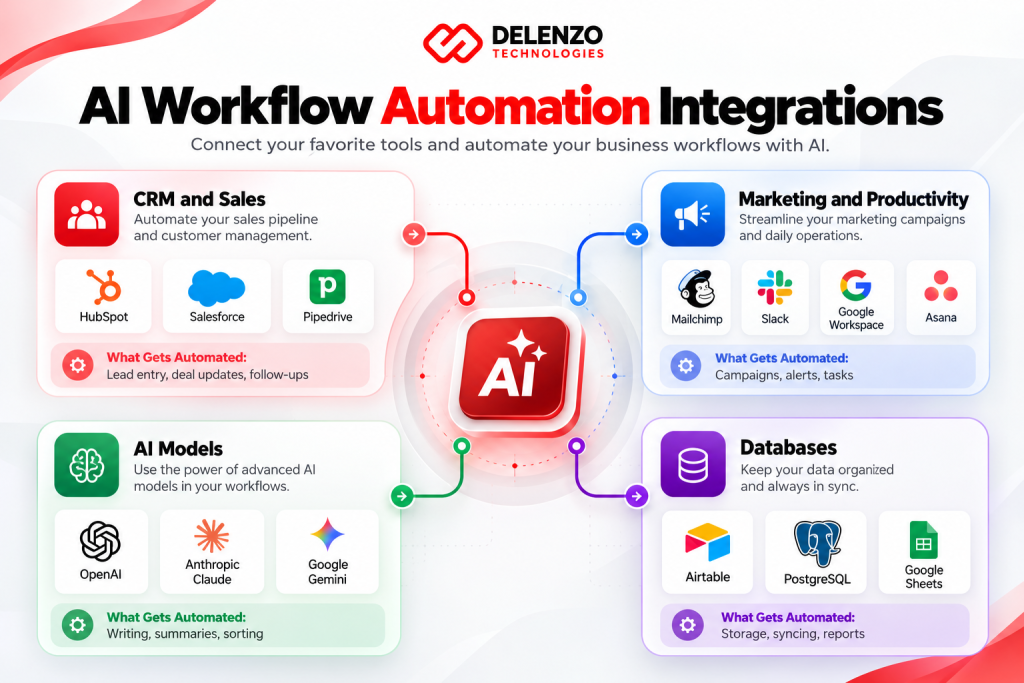
AI Workflow Automation Integrations
Most AI workflows can connect with any tool that has an API, including CRMs, email, ecommerce platforms, and databases.
The right AI automation platform depends on your current tools, budget, and data needs.
| Category | Common Tools | What Gets Automated |
| CRM and sales | HubSpot, Salesforce, Pipedrive | Lead entry, deal updates, follow-ups |
| Marketing and productivity | Mailchimp, Slack, Google Workspace, Asana | Campaigns, alerts, tasks |
| AI models | OpenAI, Anthropic Claude, Google Gemini | Writing, summaries, sorting |
| Databases | Airtable, PostgreSQL, Google Sheets | Storage, syncing, reports |
If a tool offers an API or webhook, it can usually join an automated workflow.
CRM and Sales Platform Integrations
CRM integrations keep customer data accurate and current without manual entry. CRM automation syncs contacts, logs emails, and updates deal stages the moment something changes.
Duplicate contacts get merged, and missing fields get filled from your forms. Your sales team works from one clean record for every customer.
Marketing and Productivity Tool Integrations
These integrations connect the apps your team already uses every day. Our team links automation tools like Slack, Asana, Google Workspace, and Mailchimp. Tasks, alerts, and campaigns then flow without copy and paste.
A new deal in your CRM can create an Asana project and post a Slack alert. Nobody has to remember the next step.
AI Models, APIs and Database Integrations
This layer gives your workflows their intelligence and memory. Your AI workflow tools can run on models like OpenAI GPT, Anthropic Claude, or Google Gemini. We also link your databases, so the AI works with your actual business data. Access controls and careful setup keep sensitive data protected at every step.
AI Workflow Automation Examples for Businesses
The most common examples are lead follow-ups, content publishing, and weekly reports. Each one is frequent, rule-based, and time-sensitive.
Each AI automation workflow below solves a common daily problem.
Automated Lead Capture and Follow-Ups
Automated lead capture collects, scores, and contacts new leads within minutes.
- A prospect submits a form or chat message.
- AI adds company details and scores the fit.
- Hot leads get a personal email and a booking link.
- Cooler leads enter a nurture email sequence.
This kind of AI lead automation means no lead waits until Monday.
Automated Content Creation and Publishing
Automated content workflows move ideas from brief to published post with fewer handoffs. A typical content workflow automation setup turns a keyword into a brief and outline, then routes it to an editor. After approval, it formats and schedules the post.
Keep human review in the loop. Google Search Central guidance rewards helpful, people-first content, however it gets produced.
Automated Reporting and Analytics
Automated reporting delivers fresh numbers to your inbox without anyone building spreadsheets. Connected data workflow tools pull your numbers every week. AI then explains trends in plain language, so owners can act fast.
A sudden drop in ad results or sales triggers an alert the same day, not at month end.
How Much Does AI Workflow Automation Cost?
AI workflow automation cost ranges from about $1,000 for a simple workflow to $25,000 or more for advanced AI agents. Monthly support often adds $200 to $2,000.
| Project Type | Estimated Cost | Typical Timeline |
| Simple workflow (2 to 3 apps) | $1,000 to $3,000 | 1 to 2 weeks |
| Multi-step workflow with AI | $3,000 to $10,000 | 2 to 6 weeks |
| Custom AI agent system | $10,000 to $25,000+ | 6 to 12 weeks |
| Monitoring and support | $200 to $2,000 per month | Ongoing |
These are estimated ranges based on typical US agency pricing. Your exact quote depends on scope and tools.
Factors Affecting AI Automation Pricing
Pricing depends on workflow complexity, number of integrations, AI usage volume, and support needs.
Compare AI automation software pricing carefully, because platform fees stack up over time.
- Steps and apps: More connections mean more build and testing time.
- AI model usage: Each AI call costs a small fee that grows with volume.
- Platform plans: Zapier, Make, and n8n each price their plans differently.
- Security needs: Compliance work adds time for finance or healthcare data.
- Ongoing support: Monitoring keeps workflows running as your apps update.
Custom Workflow Development Costs
Custom development costs more upfront but often saves money over time compared to stacking many subscriptions. Custom workflow automation services make sense when standard tools can’t handle your logic or volume. A one-time build can replace several monthly tools.
Ask any provider for a fixed-scope quote and a clear support plan before you sign.
Why Choose Delenzo Technologies for AI Workflow Automation?
Delenzo Technologies is a Dallas-based digital agency that builds practical AI automation for businesses across the USA. Our focus is workflows that save measurable time, not flashy demos.
As an AI workflow automation company, we support teams in Dallas, Plano, Frisco, and Richardson, plus clients nationwide.
Customized Automation Solutions
Every workflow we build fits your tools, team, and goals. We don’t sell one-size packages. Our automated workflow solutions start from your own process map, then remove the steps that waste time.
A ten-person agency and a growing online store get very different builds, because their days look very different.
Scalable Integrations and Workflows
Each workflow is designed to grow with your business from day one. Whether you need one AI workflow automation platform or a mix of tools, we build clean integrations. Adding new apps later stays simple.
Every workflow comes documented, so your team can understand and adjust it without waiting on us.
Continuous Monitoring and Optimization
Automation is not a one-time setup, and we treat it that way. Our AI workflow management includes weekly results reviews, error alerts, and regular tuning. Flexible contracts mean you stay for results, not because you’re locked in.
When an app updates or a workflow slows down, we catch it early and fix it.
Frequently Asked Questions
What is AI workflow automation?
AI workflow automation is the use of artificial intelligence to run multi-step business tasks automatically. It reads data, makes simple decisions, and handles tasks like sorting emails or updating CRMs.
How can AI automate business processes?
AI automates business processes by connecting your apps and handling repeat steps. It can score leads, process invoices, answer support tickets, and build reports with little human input.
Can AI automation integrate with existing software?
Yes. AI automation connects with most existing software through APIs and webhooks, including HubSpot, Salesforce, Shopify, Slack, and Google Workspace. Your team keeps using the tools it already knows.
How much does AI workflow automation cost?
Most AI automation projects cost an estimated $1,000 to $25,000 or more, depending on complexity. Monthly monitoring and support usually adds $200 to $2,000 on top.
How long does AI workflow implementation take?
Most AI workflow implementations take 1 to 12 weeks, depending on scope. Simple workflows launch in 1 to 2 weeks, while custom AI agent systems need 6 to 12 weeks.
Automate Your Business with Delenzo Technologies
Delenzo Technologies helps businesses across the USA replace busywork with reliable AI workflows. From our base in Dallas, we analyze your processes, build the right automations, and review results every week.
If repeat tasks are slowing your team down, AI workflow automation is the smartest fix to test first. Start with one workflow, measure the hours saved, then expand.
Contact Delenzo Technologies to map your first workflow together.