



People searching for a ChatGPT watermark remover are often chasing three different things. One is a visible logo or label. Another is hidden metadata inside the image file. The third is an invisible signal woven into the pixels themselves. Each one works differently, and each reacts differently to editing. That is why so many online guides give confusing or outdated answers. OpenAI changed its approach in May 2026, and older advice no longer tells the full story. This guide explains what ChatGPT actually adds to images and text. It also shows how to check an image and what removal tools really do. If you publish AI visuals on a business website, this affects both trust and search visibility.
Does ChatGPT Add a Watermark?
Yes, but not in the way most people picture it. ChatGPT images usually carry hidden provenance signals rather than a visible logo. Many searches for does ChatGPT add watermarks come from people expecting a stamp in the corner. In reality, there are three separate layers to understand.
Visible Watermarks
A visible watermark is anything a person can see on the image. Common examples include:
- A logo or brand mark
- A text label such as “AI generated”
- A disclosure badge in a corner
- A pattern or overlay across the image
ChatGPT does not stamp a visible logo on its images by default. A ChatGPT image watermark that you can actually see is usually added by a person. You can ask for a disclosure label in your prompt or add one later in an editor. Some social platforms also add their own AI labels when you upload.
C2PA Metadata
C2PA metadata is a signed record attached to the image file that describes its origin. C2PA stands for the Coalition for Content Provenance and Authenticity. Its members include Adobe, Google, Microsoft, Sony, the BBC and now OpenAI.
ChatGPT C2PA metadata can show that an image was created or edited with OpenAI tools. It may include the issuer, the creation time and AI-use details. OpenAI has attached C2PA data to its images since the DALL·E 3 era. In May 2026, it also became a C2PA conforming generator. That means other C2PA-compatible tools can read and display this record.
Invisible SynthID Watermark
SynthID is an invisible watermark embedded directly into the pixels of a generated image. You cannot see it, and it does not live in the file metadata. Google DeepMind built SynthID, and OpenAI adopted it through a partnership announced in May 2026.
ChatGPT SynthID watermarking now covers images made in ChatGPT, Codex and the OpenAI API. OpenAI describes the two layers as working together. C2PA carries detailed context, while SynthID keeps a signal alive when metadata gets lost.
Visible Watermark vs Metadata vs Invisible Watermark
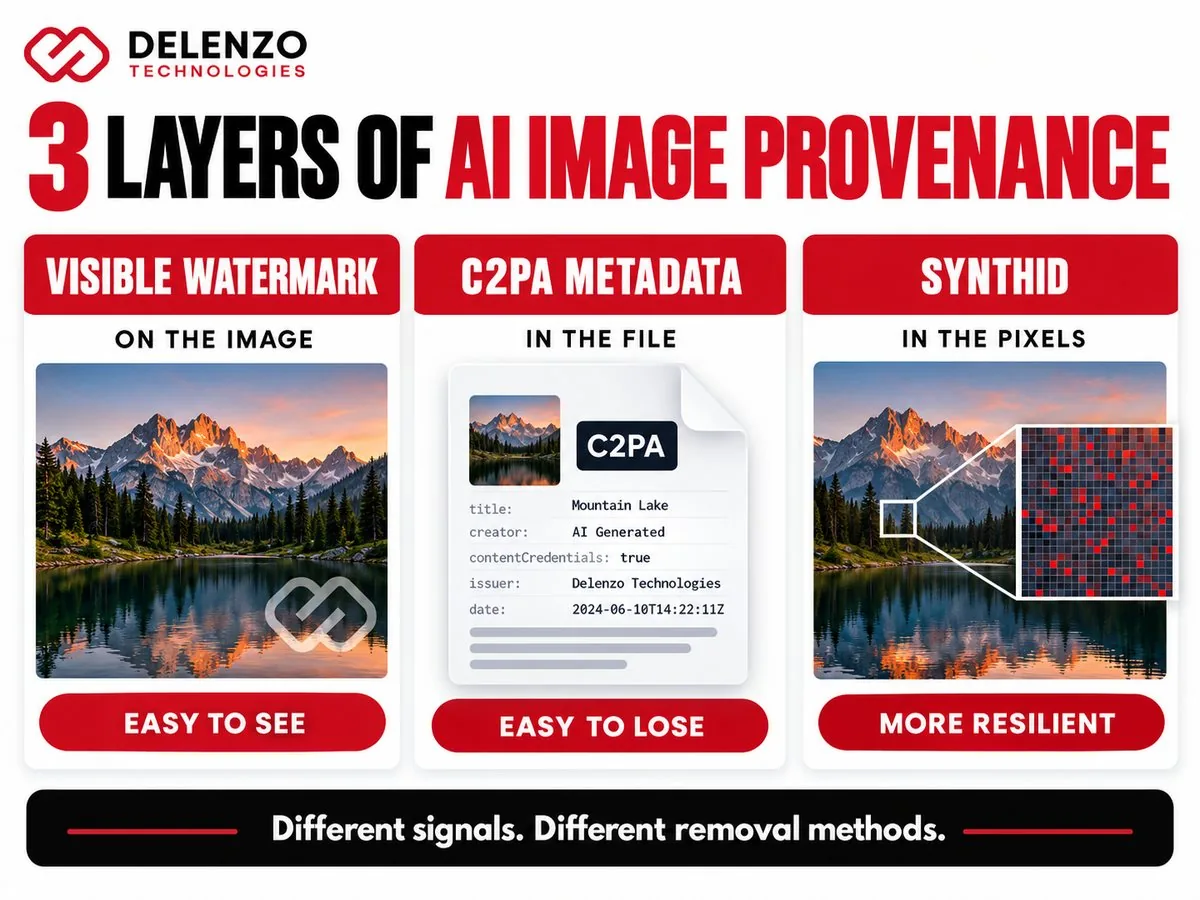
The key difference is where each signal lives and who can see it. Only a visible watermark shows up to the human eye. The other two work quietly in the background.
| Aspect | Visible Watermark | C2PA Metadata | SynthID |
|---|---|---|---|
| Visible to people | Yes | No | No |
| Where it lives | On the image surface | In the file metadata | Woven into the pixels |
| Main purpose | Disclosure or branding | Origin and edit history | AI-origin verification |
| How easily lost | Can be cropped or covered | Often lost in conversion | Built to be more resilient |
An AI image watermark can be visible, stored in metadata or embedded in pixels, and each behaves differently.
Does ChatGPT Watermark Images in 2026?
Yes. Supported images from ChatGPT, Codex and the OpenAI API now carry C2PA Content Credentials and a SynthID watermark. Anyone asking does ChatGPT watermark images should know that coverage is not perfectly uniform. It can vary by product, model, file type, export path and creation date. OpenAI itself notes that not all of its generated content contains a supported signal.
Why Older Watermark Guides May Be Outdated
Many tutorials were written before OpenAI added SynthID in 2026. They often claim the only ChatGPT generated image watermark is metadata you can easily lose. That was closer to true in 2024, when C2PA was the main signal. Here is how the picture has changed:
- 2024: DALL·E 3 images in ChatGPT began carrying C2PA metadata.
- May 2026: OpenAI added invisible SynthID watermarking to supported images.
- May 2026: OpenAI joined the C2PA steering committee and became a conforming generator.
- 2026: OpenAI launched a public preview tool that checks images for both signals.
Advice that ignores the SynthID layer now gives an incomplete answer.
Does ChatGPT Add a Watermark to Text?
No. OpenAI’s current provenance tools cover images and audio, not ordinary ChatGPT text responses. Searches for does ChatGPT watermark text often come from worry about hidden tags in copied text. OpenAI’s public Verify tool does not check text at all. OpenAI has explored text watermarking but has not publicly launched it for everyday ChatGPT replies. Unusual spacing characters sometimes appear in AI text. OpenAI has not described these as an official watermark. Treat any tool promising to strip a “ChatGPT text watermark” with healthy caution.
AI Text Detection vs Watermarking
AI detection and watermarking are two different things. A detector guesses whether text looks AI-written based on patterns. A watermark is a signal the generating system deliberately embeds at creation.
Any ChatGPT watermark detector built for text is really a pattern-based guessing tool. These tools can flag human writing as AI and miss edited AI writing. Their scores are estimates, not proof. A provenance signal, by contrast, either matches a known source or it does not.
What Does a ChatGPT Watermark Remover Actually Remove?
It depends on which layer the tool targets. Most tools only affect one layer, and many users never realize the others remain. Searches like remove ChatGPT watermarks usually point to one of these three jobs.
Visible Overlay
This is the simplest case. A visible logo, text label or badge sits on top of the image. Standard editing tools can crop it or cover it. Removing it changes what people see, but it does not touch the hidden layers.
Metadata
Some tools strip or rewrite file metadata. This also happens by accident during everyday tasks. OpenAI notes that C2PA data can be lost during editing, conversion, uploading or sharing. Many social platforms and image optimizers remove metadata to shrink file sizes.
Invisible Provenance Signal
This is where most removal claims fall apart. SynthID is embedded in the image itself, not attached to the file. It is designed to survive common changes like resizing, compression and light edits. Stripping metadata therefore does not mean every provenance signal is gone. A single ChatGPT watermark remover may clear one layer while leaving another fully intact.
Can You Remove ChatGPT C2PA Metadata?
Yes, C2PA metadata can be lost, often without anyone trying. Ordinary file handling drops it all the time. Common causes include:
- Saving the image in a new format
- Running it through an image optimizer
- Uploading to platforms that clean metadata
- Editing in software that does not preserve Content Credentials
Losing AI generated image metadata does not erase the SynthID layer. Metadata and an embedded watermark are separate systems. One can disappear while the other stays detectable.
Can You Remove the Invisible SynthID Watermark?
SynthID is built to be far harder to remove than metadata. It is designed to survive some cropping, filtering, resizing and lossy compression. The ChatGPT invisible watermark is still not a guaranteed permanent mark. OpenAI openly states that no provenance method is perfect. Very heavy transformations can weaken the signal enough to block detection.
The key point is simple. No detection does not prove an image was never AI-generated. A missing signal only means the tool found nothing it could confirm.
How to Check Whether an Image Was Generated by ChatGPT
The most reliable method is uploading the original file to OpenAI’s Verify tool. If your search is how to tell if image was made by ChatGPT, start there. It checks for the signals OpenAI actually embeds, instead of guessing from appearance.
OpenAI Verify
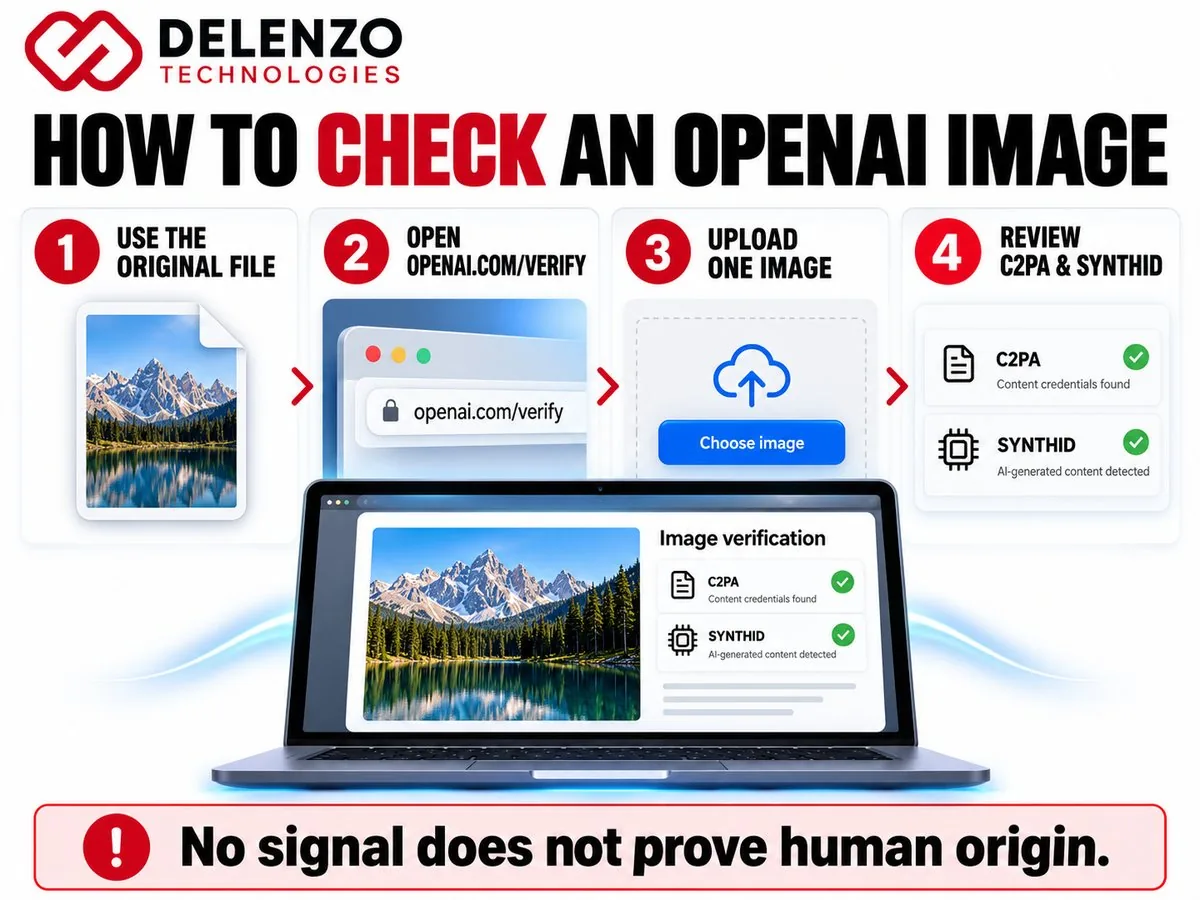
OpenAI Verify is a public preview tool for OpenAI image verification. It checks for C2PA metadata and SynthID watermarks in images and audio. Here is how to use it:
- Find the original image file, not a screenshot or compressed copy.
- Open the Verify page at openai.com/verify.
- Upload a single image in PNG, JPEG or WebP format.
- Review the result for C2PA metadata, a SynthID watermark or no supported signal.
- If C2PA is found, check the listed issuer before attributing the image.
A detected signal strongly suggests the image came from OpenAI tools. A missing signal is not proof the image came from somewhere else. Developers can run the same check through OpenAI’s content provenance API.
Why OpenAI Verify Might Show No Signal
A blank result usually means the signal was lost or never added, not that a human made the image. Common reasons include:
- The image was created before OpenAI added these signals.
- It came from an unsupported model, product or export path.
- The metadata was stripped during editing or uploading.
- The file was converted to another format.
- Heavy compression weakened the embedded signal.
- Cropping or editing degraded the watermark.
- The file type is not supported by the tool.
For the most accurate result, always test the original download.
Does Taking a Screenshot Remove a ChatGPT Watermark?
A screenshot usually removes the original C2PA metadata, but not necessarily the SynthID watermark. A screenshot creates a brand new file with fresh metadata. The pixels, however, still closely match the original image. Because SynthID lives in the pixels, it may still be detectable. Detection is not guaranteed, especially if the screenshot is small or heavily cropped.
Does Cropping or Compressing Remove It?
Cropping and compression often remove C2PA metadata, while SynthID is designed to hold up better. Here is how each layer typically responds:
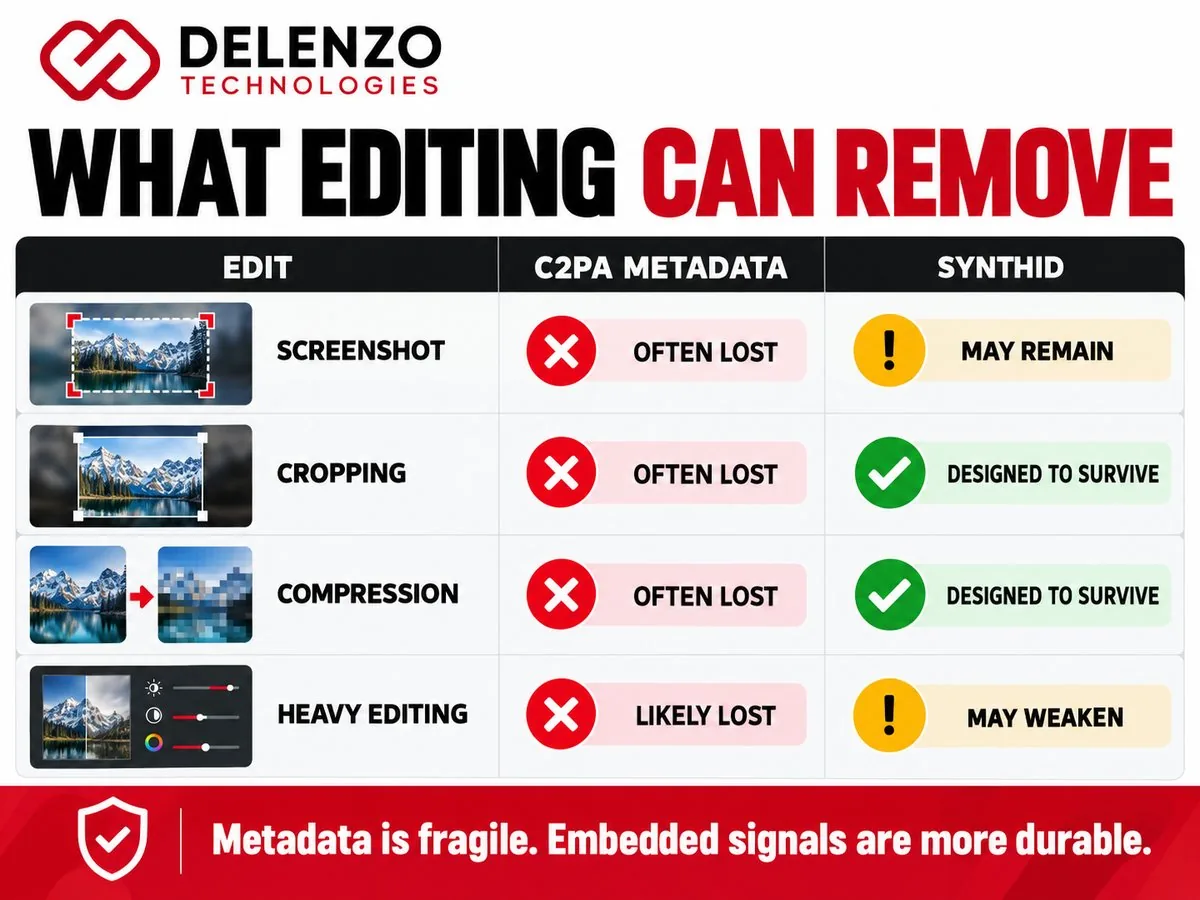
| Aspect | C2PA Metadata | SynthID |
|---|---|---|
| Light cropping | Often lost, depending on the tool | Designed to survive |
| JPEG compression | Often lost on re-save | Designed to survive |
| Resizing | May be lost | Designed to survive |
| Heavy editing | Likely lost | Signal may weaken |
Metadata is fragile and SynthID is more resilient, but neither layer is guaranteed to survive every edit.
ChatGPT Watermark vs Other AI Image Generators
AI image tools use different mixes of provenance methods, so no single universal watermark exists. Common approaches include:
- Visible labels or disclosure badges
- C2PA Content Credentials
- Invisible watermarking such as SynthID
- Private in-house detection systems
Google uses SynthID across its own AI image tools. It has also announced C2PA and SynthID checks for Search and Chrome. Adobe Firefly attaches Content Credentials to its generated images. Many teams also use AI social media post generators, which follow their own labeling rules. Policies change often, so check each tool’s current documentation before relying on it.
Should You Remove AI Provenance Information?
For most businesses, the smarter move is keeping provenance where it fits and managing files responsibly. There are normal reasons a clean, edited asset is needed:
- Resizing images for faster page loads
- Editing or retouching for brand consistency
- Converting formats for a CMS
- Publishing across social platforms
- Reducing file size for Core Web Vitals
These tasks can strip metadata as a side effect. That is very different from deliberately hiding AI use. Provenance also brings real value to your brand:
- Transparency with your audience
- Stronger brand trust and credibility
- Clear editorial disclosure
- Easier content verification
- Alignment with platform and ad policies
When Disclosure Matters
Disclosure matters most when viewers could be misled about what is real. Pay extra attention in these situations:
- News and editorial content
- Client deliverables and agency work
- Paid advertising
- Regulated fields such as health, finance and legal
- Public images showing real people, places or events
Some platforms and regions also require AI labels on certain content. Check the rules for every channel you publish on.
Best Practices for Using ChatGPT Images on a Website
AI images can help a website when they are optimized, honest and reviewed by a person. These practices keep your visuals useful for visitors and search engines.
Optimize File Size
Large images slow down pages and frustrate visitors. Compress images and serve modern formats like WebP. Some optimizers strip C2PA data during this step. Keep an original copy with its metadata in your records. Fast-loading images are a core part of any Dallas web design project.
Use Descriptive Alt Text
Alt text helps screen readers and image search. Describe what the image shows in plain language. Skip keyword stuffing and vague labels like “AI image.”
Avoid Misleading AI Imagery
Never use AI images to fake product results, team photos or customer stories. Misleading visuals damage trust faster than a slow page. They can also create legal risk in advertising.
Preserve Disclosure When Appropriate
If an image could pass for a real photo, add a short caption or label. This small step is honest and builds credibility with readers.
Add Human Review Before Publishing
Check every AI image for odd hands, warped text and factual errors. A quick human review catches problems before they reach your audience. Google Search Central focuses on content quality and usefulness, not simply how content was produced.
Use Original Visuals Where Possible
Real photos of your team, products and projects build more trust than generic AI scenes. Use AI design tools for concepts and illustrations. Save original photography for places where authenticity matters most.
At Delenzo Technologies in Dallas, our team helps businesses across the USA plan visuals that support search and trust. We pair AI workflows with human design review and a clear SEO, AEO and GEO strategy. If you are weighing AI website builders, we can help you find the right balance of automation and human work.
ChatGPT Watermark Myths
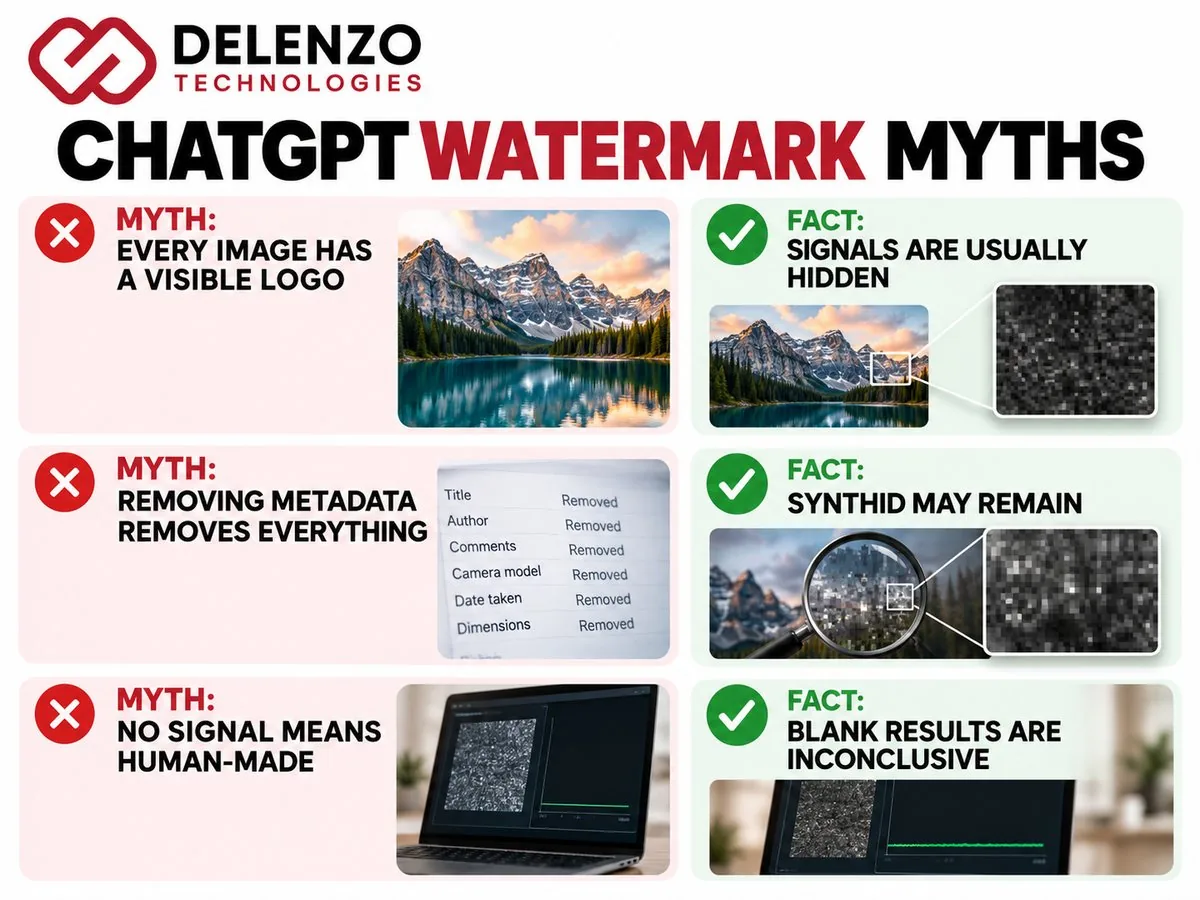
| Myth | Fact |
|---|---|
| Every ChatGPT image has a visible logo. | False. Default images carry hidden signals, not a visible logo. |
| Removing metadata removes every AI provenance signal. | Not necessarily. SynthID can remain in the pixels. |
| ChatGPT text carries the same watermark as images. | No. Current provenance tools cover images and audio, not everyday text. |
| If OpenAI Verify finds nothing, the image is not AI-generated. | False. Signals can be lost, and older images may have none. |
| C2PA and SynthID are the same technology. | No. C2PA is file metadata, while SynthID is embedded in the media. |
The biggest myth is that one removal step clears everything, when provenance actually works in layers.
Frequently Asked Questions
Does ChatGPT add watermarks to images?
Yes. Supported ChatGPT images carry C2PA metadata and an invisible SynthID watermark. These signals are hidden, so the image looks normal. Coverage can vary by model, product and creation date.
Are visible watermarks added to ChatGPT images?
No, not by default. ChatGPT images do not show a logo or stamp unless one is requested. You can ask for a disclosure label in your prompt or add one later.
Does ChatGPT watermark text?
No. OpenAI’s current provenance signals cover supported images and audio, not ordinary text replies. AI text detectors only estimate authorship from patterns, so their results are guesses rather than proof.
What is the ChatGPT invisible watermark?
It is SynthID, a signal from Google DeepMind embedded in the pixels of supported images. People cannot see it. It is built to survive resizing, compression and many common edits.
What is C2PA metadata in ChatGPT images?
C2PA metadata is a signed record stored inside the image file. It can show the issuer, creation time and AI involvement. It adds useful context but can disappear during editing or uploads.
What is SynthID?
SynthID is an invisible watermarking technology created by Google DeepMind. It embeds a signal directly into generated media. OpenAI added it to supported images in 2026 so provenance survives lost metadata.
Can ChatGPT metadata be removed?
Yes. C2PA metadata is often lost through format conversion, image optimizers, platform uploads or editing software. This usually happens by accident during normal file handling rather than through any special tool.
Does removing metadata remove the AI watermark?
Not necessarily. Metadata and SynthID are separate layers. Removing metadata leaves the embedded SynthID signal in the pixels, so OpenAI Verify may still identify the image as OpenAI-generated.
Can screenshots remove ChatGPT watermarks?
A screenshot usually drops the original C2PA metadata because it creates a new file. The SynthID signal lives in the pixels, so it may still be detected, though results vary.
How can I check if an image was generated by ChatGPT?
Upload the original file to OpenAI Verify at openai.com/verify. The tool checks for C2PA metadata and SynthID. A detected signal strongly suggests OpenAI origin, while no signal proves little.
Does OpenAI Verify detect every ChatGPT image?
No. Older images, unsupported models, stripped metadata and heavy edits can all block detection. OpenAI says not all of its generated content carries a supported signal, so blank results are inconclusive.
The Bottom Line: ChatGPT Watermarks Are More Than a Visible Logo
In 2026, a “ChatGPT watermark” can mean a visible mark, C2PA metadata or an invisible SynthID signal. Knowing which one you face matters more than searching for a generic ChatGPT watermark remover. Metadata is fragile, SynthID is more durable and visible labels are a choice. OpenAI Verify is the best place to check an image, though a blank result proves little. Content provenance is also shaping the digital marketing trends in 2026 worth watching. If you want AI visuals that are fast, honest and search-ready, Delenzo Technologies in Dallas can help. We work with businesses across the USA to publish content people can trust.