


Most quotes for ecommerce website design services land anywhere between $500 and $10,000+, and almost none explain why. The gap usually comes down to scope whether the project includes product setup, payment configuration, inventory integration, and post-launch support, or just a homepage and a few templates. Before comparing dollar figures, know what’s actually inside the box.
This guide breaks down the real deliverables, the full build process, and the true cost of ownership so you can evaluate a proposal the way an agency would.
What’s Actually Included in Professional Ecommerce Website Design Services?
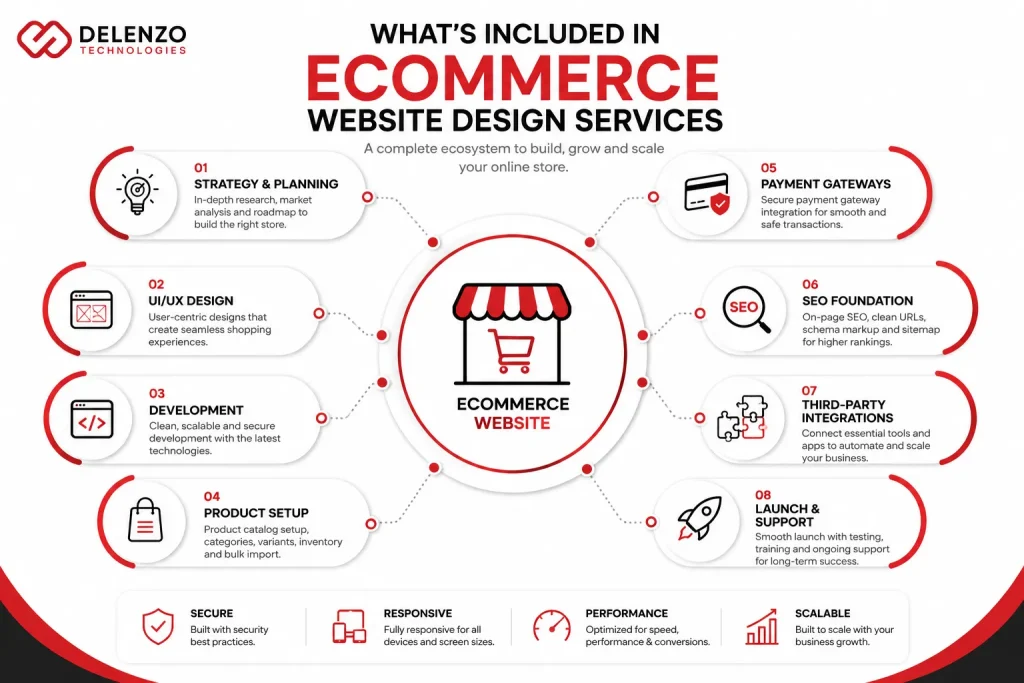
Professional ecommerce website design services typically include strategy, custom design, front-end and back-end development, product catalog setup, checkout and payment configuration, SEO foundations, third-party integrations, and launch support. Scope varies by package, but these seven categories define a complete build.
A surprising number of “design” quotes only cover the visual layer homepage, category template, product template and leave you to configure payment gateways, shipping rules, and tax logic yourself. That’s where budgets quietly double. A complete ecommerce website design services checklist accounts for every layer of the store, not just what a designer can show you in Figma.
Here’s how scope typically breaks down across service tiers:
| Deliverable | Basic Build | Standard Build | Advanced Build |
| Custom UI/UX design | Template-based | Semi-custom | Fully custom |
| Product templates | 1 | 2–3 | Unlimited variants |
| Payment gateway setup | 1 gateway | 2–3 gateways | Multi-gateway + multi-currency |
| Product upload/setup | Up to 50 SKUs | Up to 500 SKUs | Bulk import, unlimited |
| SEO foundation | Basic meta setup | Schema + meta + sitemap | Full technical SEO audit |
| Third-party integrations | 1–2 apps | 3–5 apps | ERP/CRM-level integration |
| Launch support | 7 days | 30 days | 60–90 days |
Checkout configuration deserves its own line item, since it’s where most revenue is won or lost covered later in this guide. SEO setup at the design stage means clean URL structures, indexable category pages, and schema markup built in from day one, not bolted on after launch. Integrations cover the tools your store depends on: email marketing platforms, review apps, shipping calculators, and increasingly, ERP systems for businesses with offline sales channels.
Ecommerce Website Design Process: From Strategy to Launch
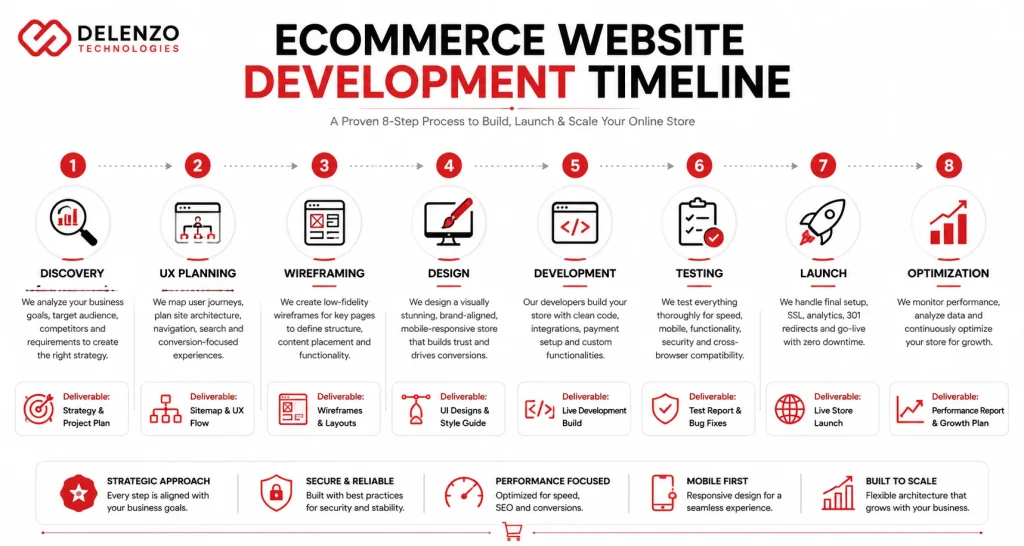
The ecommerce website design process moves through eight stages: discovery, UX planning, wireframing, design, development, testing, launch, and post-launch optimization. Each stage produces a deliverable the next depends on. This is why skipping steps almost always shows up as rework later.
Discovery
The ecommerce discovery phase defines your business goals, target audience, competitor landscape, platform requirements, and project scope before any design work begins. This stage typically takes one to two weeks. It includes a technical audit if you’re migrating. It also includes a review of three to five direct competitors to spot gaps you can capitalize on. Platform requirements get locked in here too Shopify, WooCommerce, BigCommerce, or a custom build. The choice depends on catalog size and integration needs.
UX Planning
Ecommerce UX planning maps user journeys, navigation structure, category architecture, search functionality, and conversion paths before a single screen gets designed. This is where the store’s logic gets defined: how customers move from landing page to product page to cart. It also covers what filtering they need along the way. Weak UX planning is the single most common reason finished stores underperform. The design can be beautiful and the navigation can still confuse buyers.
Wireframing
Ecommerce website wireframing produces low-fidelity layouts for the homepage, category pages, product pages, cart, and checkout. It establishes structure and content hierarchy before visual design is applied. Wireframes are deliberately stripped of color and branding. This lets stakeholders focus on layout decisions. Where does the add-to-cart button sit, and how many products show per row? Do filters live in a sidebar or top bar? Catching structural problems here costs a revision. Catching them after full design is built costs a rebuild.
Design
Ecommerce website design at this stage means custom branding application, responsive layouts across desktop and mobile, refined product page design, and trust-building elements like reviews and security badges. This is the visual layer most people picture when they hear “ecommerce design.” But it’s only stage four of eight. It’s not the whole project. Photography treatment, typography, and color systems all get finalized here. They guide a shopper’s eye from product image to price to add-to-cart button.
Development
Ecommerce website development implements the front-end interface and back-end functionality, including payment gateway integration, third-party connections, and any custom features the design called for. This is where wireframes become a functioning store. Product variants become selectable, the cart calculates totals and tax in real time, and checkout connects to your payment processor. Features like subscription billing, loyalty programs, or B2B pricing tiers also get built during this stage.
Testing
Ecommerce website testing covers page speed, checkout flow, mobile responsiveness, payment processing, and cross-browser compatibility before anything goes live. A thorough QA pass tests checkout with multiple payment methods. It simulates failed transactions to confirm error handling works, and checks rendering across major browsers. Skipping this stage is how stores end up with a broken checkout button on mobile. Nobody catches it until a customer complains.
Launch
A solid ecommerce website launch checklist includes final QA, SSL certificate setup, analytics installation, 301 redirects for migrated URLs, and a staged go-live deployment. Launch day should be uneventful if prior stages were done properly. DNS changes get scheduled during low-traffic windows. Redirects get tested before the old site goes dark, and analytics get verified with a live test transaction.
Post-Launch Optimization
Post-launch work monitors conversion rates, user behavior, Core Web Vitals, and ongoing performance. It surfaces improvement opportunities the data reveals once real customers start shopping. Ecommerce conversion optimization doesn’t stop at launch. Heatmaps, session recordings, and checkout funnel reports typically surface within the first 30 days. They point to fixable friction points no pre-launch testing can predict.
The True Cost of Ownership: Hosted SaaS vs Custom Self-Hosted Architecture
Hosted SaaS platforms like Shopify carry lower upfront costs but ongoing subscription and app fees. Custom self-hosted builds like WooCommerce cost more initially but offer lower long-term platform fees. The right answer depends on the growth trajectory, not just the launch budget.
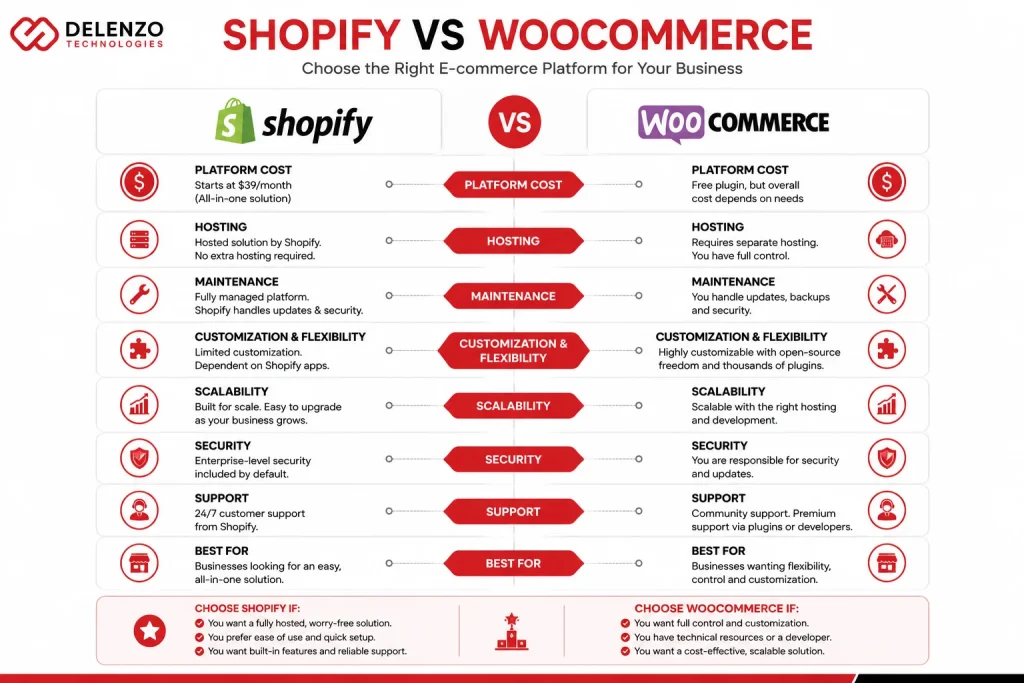
A shopify vs woocommerce design cost comparison looks straightforward on the surface. Shopify plans start around $39/month, and WooCommerce is “free.” But the real cost shows up over 12 to 36 months. It emerges once hosting, apps, fees, and developer time are factored in.
| Cost Factor | Shopify (Hosted SaaS) | WooCommerce (Self-Hosted) |
| Platform fee | $39–$2,300/month | $0 (open-source core) |
| Hosting | Included | $20–$300/month |
| Required apps/plugins | $50–$500/month avg. | $30–$400/month avg. |
| Transaction fees | 0.5%–2% (unless using Shopify Payments) | Gateway-dependent, typically 2.9% + $0.30 |
| Development flexibility | Moderate (theme/app constraints) | High (full code access) |
| Maintenance responsibility | Shopify-managed | Business/agency-managed |
| Typical 3-year TCO (mid-size store) | $15,000–$45,000 | $20,000–$60,000+ |
Shopify generally wins on predictability patches, uptime, and PCI compliance are handled for you. WooCommerce wins on flexibility and long-term cost control for complex catalogs, but that comes with hosting, security, and update responsibilities, either in-house or through a retainer.
The 35% Revenue Problem: Why Checkout Architecture Matters More Than Visual Design
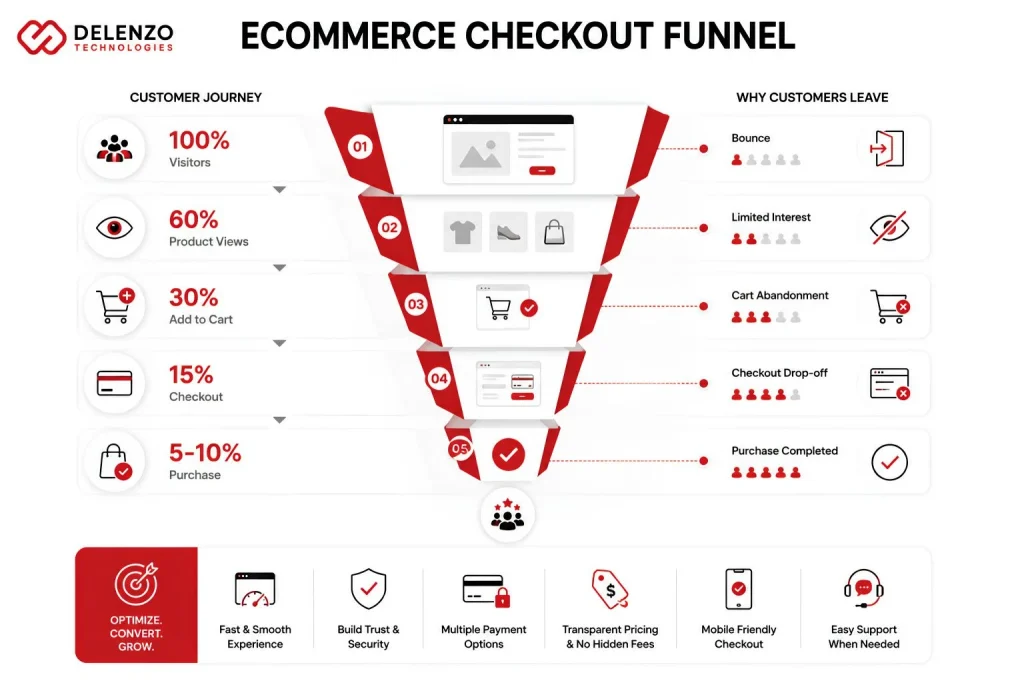
Cart abandonment rates hover around 70% industry-wide. Checkout friction, not visual design, is consistently cited as one of the top reasons customers leave without buying. Ecommerce checkout ux design has a direct, measurable line to revenue. Homepage aesthetics don’t have that same effect.
The most common checkout failures are structural:
- Forcing account creation before purchase
- Hiding shipping costs until the final step
- Requiring too many form fields
- Offering too few payment methods
Each is a design decision. Each is fixable without touching the rest of the site. Guest checkout alone can recover a meaningful share of abandoned carts. A forced account requirement is one of the most-cited reasons shoppers give for leaving.
A well-architected checkout typically includes:
- A visible progress indicator
- Real-time shipping cost calculation
- Multiple payment options, including digital wallets
- Auto-fill for returning customers
None of this requires a brand redesign. It requires treating checkout as its own design problem, not an afterthought.
The Redesign & Product Migration Blueprint: Moving SKUs and Customer Records Safely
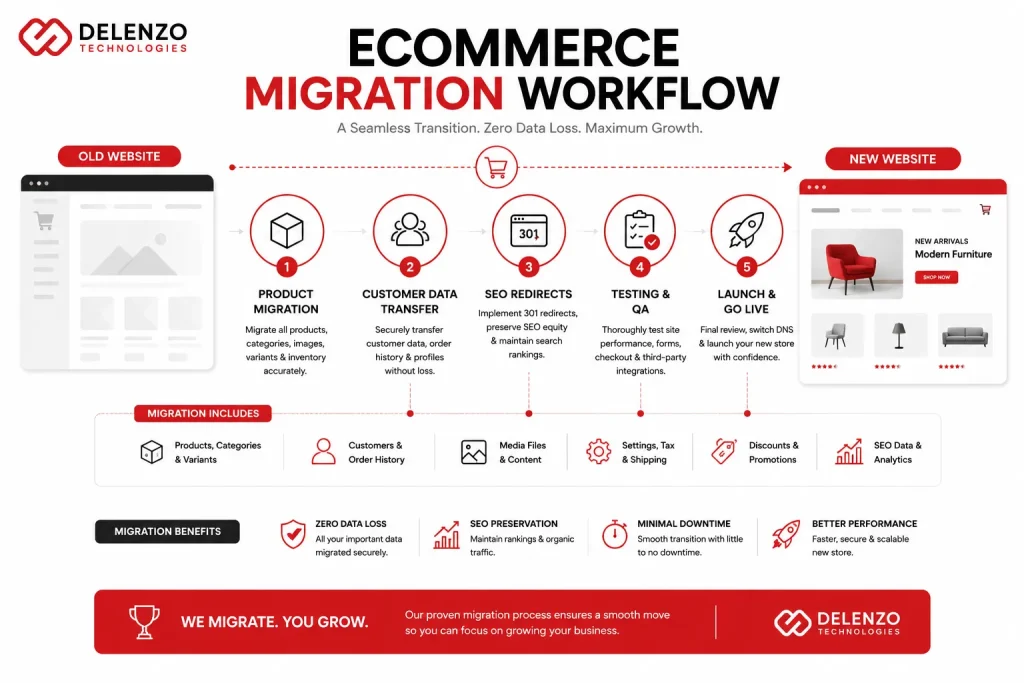
Product and data migration during a redesign covers SKU transfer, customer records, URL redirects, and SEO preservation. Getting any one wrong can mean lost rankings, order history, or customer trust. A proper ecommerce product migration agency workflow treats migration as its own project phase, not a launch-week afterthought.
A non-negotiable list for a safe migration:
- Full product export with attributes intact — SKUs, variants, images, and metafields need to map cleanly to the new schema, not transfer as a flat CSV.
- Customer record and order history transfer — critical for stores with loyalty programs or subscription billing tied to customer IDs.
- 301 redirect mapping for every indexed URL — Each old URL should be redirected to its specific new equivalent; blanket redirects can damage SEO equity.
- Pre-launch crawl comparison — a side-by-side audit confirming nothing indexed is left orphaned.
Rankings built over years can erode within weeks if redirects are sloppy. This is why migration planning happens during discovery, not as a launch-week scramble.
Back-End Data Pipeline: Inventory Sync, ERP, and CRM Integration
Back-end integrations connect your storefront to inventory management, ERP, and CRM systems. This keeps stock levels, orders, and customer data accurate across every sales channel without manual updates. Ecommerce inventory sync erp work matters most for multi-channel businesses in-store, wholesale, and online. A manual spreadsheet update is one typo away from an overselling problem.
A connected pipeline typically syncs inventory counts in real time. It pushes new orders into the ERP for fulfillment and pulls purchase history into the CRM for segmentation. Build complexity depends on which systems you’re connecting. A NetSuite integration is a different scope than syncing a single POS feed. That difference should be priced explicitly, not bundled into a flat “integrations” line.
Dallas Ecommerce Market: Why Local Agency Partnership Changes Your Results
A Dallas ecommerce web design company brings practical advantages remote agencies can’t always match: same-timezone collaboration, familiarity with Texas sales tax rules, and proximity to DFW’s logistics network. None of these are dealbreakers alone, but together they remove real friction from the process.
Texas sales tax setup is more than a single toggle. Origin-based sourcing rules, taxable vs. exempt categories, and marketplace facilitator obligations all need correct configuration at the platform level. A local team catches these misconfigurations before launch, not after a tax filing reveals them. Same-timezone collaboration also speeds up launch-week fixes, where a same-day response can mean the difference between a smooth go-live and a weekend of lost sales.
How to Choose an Ecommerce Web Design Agency: 8 Questions to Ask Before Signing
Before signing with any agency offering ecommerce website design services, get clear answers on these eight points:
- Get product setup, integrations, and SEO foundations itemized in the base scope, with anything billed separately called out clearly.
- Confirm SKU transfer, redirects, and SEO preservation are explicitly scoped, and that someone owns the migration plan.
- Find out which payment gateways and integrations are included by default versus added on post-launch.
- Ask what post-launch support actually covers: bug fixes only, or also performance monitoring and content updates.
- Pay attention to how checkout UX is addressed in the design process, since a vague answer is a red flag.
- Ask to see ecommerce-specific case studies, not general web design work, since the demands differ.
- Get a realistic timeline and what could extend it, since catalog size and integrations cause most delays.
- Confirm what the maintenance retainer includes after support ends, including hosting, security, and Core Web Vitals monitoring.
A serious agency answers all eight without hesitation. Vague answers to two or three usually preview how the project will go.
Ongoing Maintenance Retainers: Security, Uptime, and Core Web Vitals Protection
Ecommerce website maintenance cost typically ranges from $200 to $2,500+ per month depending on store complexity. It covers hosting management, security monitoring, software updates, and performance audits that keep the store fast and stable long after launch. A store that isn’t actively maintained degrades quietly, plugin conflicts pile up, page speed drifts, and security vulnerabilities go unpatched until something breaks publicly.
A reasonable retainer includes:
- Monthly uptime and security monitoring
- Scheduled platform updates
- Quarterly Core Web Vitals audits
- A defined response time for emergency fixes
Treating maintenance as optional is a common reason a well-built store underperforms within a year not because the build was flawed, but because nothing kept it current.
Build It Once, Build It Right
A capable ecommerce website design services partner treats your store as a system strategy, design, development, data, and ongoing performance working together, not disconnected deliverables. At Delenzo Technologies, we build Dallas-based and nationwide ecommerce stores, including small business ecommerce projects, with that full picture in mind, from discovery through post-launch optimization, so the site you launch with keeps converting a year later.
If you’re evaluating a redesign, a platform migration, or a new store build, we’re happy to walk through your scope and give you a clear, itemized look at the work involved. Get in touch with Delenzo Technologies to start the conversation.
Frequently Asked Question
Yes, professional ecommerce web design includes payment gateway setup. Agencies configure gateways like Stripe, PayPal, or Shopify Payments, test transactions, and secure checkout before launch, so payments work correctly from day one.
E-commerce product migration typically costs $500 to $5,000, depending on catalog size. Pricing scales with SKU count, customer data complexity, and redirect mapping needs. Larger catalogs with custom attributes or order history transfer cost more.
Neither is universally better. Shopify suits faster, lower-maintenance builds with predictable monthly costs. WooCommerce suits businesses wanting full code control and lower long-term platform fees, but it requires more hands-on hosting and maintenance management.
Hidden costs include app subscriptions, payment processing fees, premium theme licenses, and post-launch support beyond the included window. Migration, custom integrations, and ongoing maintenance retainers are often quoted separately, not bundled into base pricing.
Dallas ecommerce web design agencies typically charge $500 to $10,000+ depending on scope. Basic builds start around $500, while custom designs with integrations and migrations can exceed $10,000.