



A website redesign can boost conversions, but it often tanks rankings overnight. Businesses invest weeks into a fresh look, then watch organic traffic collapse within days of launch. The cause is rarely bad design. It is poor planning around website redesign SEO. Search engines depend on stable URLs, consistent content, and clean technical signals. Change too much at once and Google loses track of what your pages mean. This guide walks through a complete SEO website redesign checklist, covering audits, redirects, launch steps, and recovery. Follow it and your new site can look better while keeping the rankings you already earned.
Whether you manage the project internally or hire a website redesign consultant, the same fundamentals apply. Rankings, traffic, and leads depend on the decisions made before a single line of new code ships.
Why Website Redesigns Hurt SEO Rankings
Redesigns hurt rankings when core SEO signals get disrupted during the rebuild. Google relies on stable URLs, internal links, content relevance, and site speed to rank pages. A website redesign process that changes these without a transition plan confuses search engines.
Common causes include renaming URLs without redirects, deleting high-performing pages, and rewriting content that is already ranked. Removing pages erases accumulated authority, and new pages take time to earn the same trust. A structured website redesign strategy protects that equity while still allowing real improvement.
SEO Checklist for a Website Redesign
A proper SEO checklist protects rankings before a single design change happens. Skipping this stage is the most common reason traffic drops after launch. The checklist below covers the three foundational steps every website redesign process needs.
Audit Your Existing Website
Understand what is already working before changing the site.
- List indexed URLs
- Identify top-performing pages
- Record titles and descriptions
- Review important backlinks
- Flag duplicate or outdated content
Preserve SEO Assets
Protect the pages, keywords and content that already generate visibility.
- Keep high-performing URLs
- Preserve important keywords
- Maintain core content
- Plan redirects before launch
- Protect existing authority
Plan the New Structure
Create a structure that works for both visitors and search engines.
- Group related pages
- Keep navigation logical
- Limit navigation depth
- Map old URLs to new URLs
- Plan internal linking
301 Redirects for Website Redesign
A 301 redirect tells Google a page has permanently moved to a new URL. Without it, search engines treat the old page as gone, and its rankings disappear too.
How a 301 Redirect Protects Your URL
This redirect discipline often determines whether a website redesign SEO effort succeeds or fails.
Website Redesign Launch Checklist
Launch day requires its own checklist separate from pre-launch planning. Technical issues at this stage are the fastest way to lose rankings within hours, since Google recrawls a rebuilt site almost immediately after it goes live.
Two areas matter most right after launch: confirming search engines can properly index and understand your new pages, and making sure the site performs fast enough to hold the rankings you worked to protect. Let’s discuss each of these in detail below.
Check Indexing, Metadata & Internal Links
Confirm every important page is indexable and properly linked after launch. Search engines need clear signals to understand your new site immediately.
- Remove any accidental noindex tags left from staging
- Submit an updated XML sitemap to Google Search Console
- Check that meta titles and descriptions carry over correctly
- Fix broken internal links pointing to old URLs
- Verify structured data and schema markup still render properly
These checks catch the errors that most often slip through during a rushed website relaunch SEO process.
Improve Core Web Vitals & Page Speed
Page speed and Core Web Vitals directly affect both rankings and user experience. Google measures loading speed, interactivity, and visual stability as ranking factors.
Compress images, enable browser caching, and minimize unnecessary scripts. Test mobile performance separately since most traffic now comes from mobile devices. A slow new site can undo the benefits of an otherwise strong redesign.
Why Traffic Drops After a Website Redesign
Traffic typically drops after a redesign due to broken redirects, lost content, or slow indexing of new pages. Google needs time to recrawl a rebuilt site, even when everything is done correctly. Some drop is normal and temporary, but a concerning drop usually points to missing redirects, deleted high-value pages, or accidental robots.txt blocks, and duplicate content between staging and live environments adds to the confusion.
Traffic Dropped After Your Redesign?
Check these common causes before assuming your redesign has permanently damaged your SEO.
SEO Recovery After a Website Redesign
Recovering rankings after a rocky redesign starts with a full technical audit of the live site. Compare current indexing, redirects, and content against your pre-launch benchmarks.
Resubmit your sitemap and request indexing for key pages through Google Search Console. Fix any broken redirects or missing meta tags identified during the audit. Rebuild lost internal links pointing to important pages.
Recovery timelines vary, but most sites see partial improvement within four to eight weeks when issues are fixed promptly. A methodical approach to website redesign SEO recovery, rather than random fixes, produces the most reliable results.
Website Redesign Cost in Dallas
Redesign pricing in Dallas typically runs from $500 to $8,000+, depending on site size and complexity. Simple brochure sites cost less, while ecommerce or custom-built platforms cost more.
SEO Migration
Redirects, migration planning and technical SEO
Small Business
5–10 pages with modern design and SEO
Mid-Size Business
Custom features, UX improvements and SEO
Ecommerce
Complex platforms, products and migration work
These figures are estimated market ranges, not fixed quotes. Actual website redesign cost depends on content volume, design complexity, and the technical work needed to protect rankings during migration.
Choosing a Website Redesign Company in Dallas
The right partner matters more than the cheapest quote. A qualified website redesign company should combine design skill with technical SEO experience.
- Look for a website redesign agency that provides a clear audit before proposing changes
- Ask how they handle redirects, indexing, and content migration specifically
- Request examples of past projects where rankings were maintained or improved after launch
- Ask about their website redesign process timeline and communication style before you commit
- Confirm pricing is itemized rather than bundled into a single vague number
- Ask what support they offer in the weeks right after launch
A capable website redesign consultant explains their process in plain terms, not vague promises. A team that reviews content and structure with you before launch reduces the risk of surprises. Transparency during planning is often the clearest sign of a reliable partner.
Why Dallas Businesses Choose Delenzo
We help Dallas businesses through website redesign services that protect rankings while modernizing design and function. SEO is treated as a core part of the rebuild, not an afterthought handled after launch.
Our website redesign experts handle audits, redirect mapping, indexing checks, and Core Web Vitals improvements as standard practice. We have worked with Dallas businesses across industries who needed a stronger site without losing years of search visibility. Every project includes a documented migration plan so nothing gets lost between the old site and the new one. Based in Dallas, USA, we understand what local businesses need from a modern, search-ready website.
From small service businesses to growing ecommerce brands, our team tailors each website redesign strategy to the client’s goals. We combine design, development, and SEO under one roof, so nothing falls through the cracks between departments.
Website Redesign vs Website Rebuild
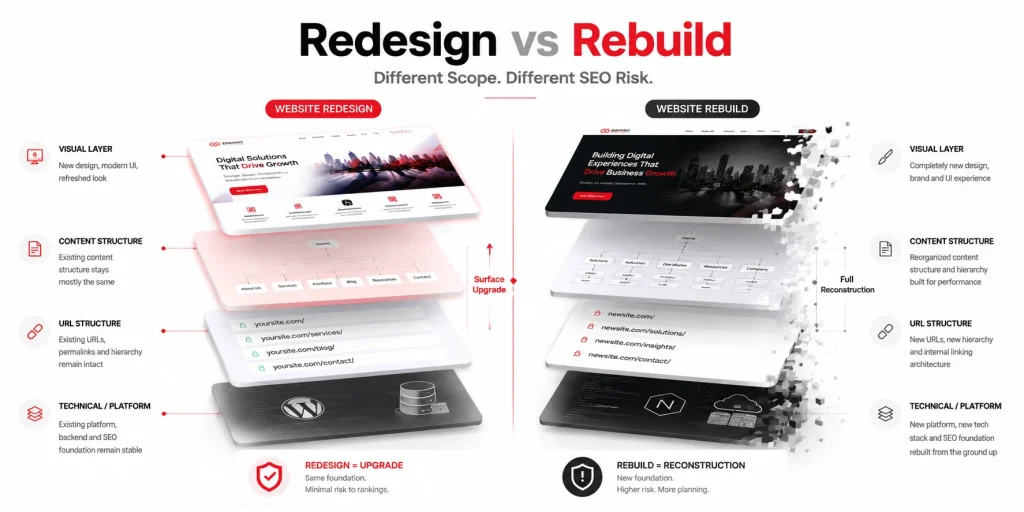
A redesign updates the look, layout, and user experience of an existing site while keeping its core structure. A rebuild often means starting over with new architecture, a new content management system, or a new domain strategy.
| Aspect | Website Redesign | Website Rebuild |
| Scope | Visual and UX updates | Structural and platform changes |
| SEO Risk | Moderate, manageable with planning | Higher, requires full migration plan |
| Timeline | Weeks to a couple months | Several months |
| Best For | Sites needing modernization | Sites needing a platform change |
Understanding which one your business needs prevents overspending or under planning the project.
Signs Your Website Needs a Redesign
Certain signals make a redesign necessary rather than optional. Recognizing them early prevents bigger problems later.
Does Your Website Need a Redesign?
The more of these problems you recognize, the stronger the case for reviewing your current website.
Business growth is another common trigger. New product lines, expanded services, or new markets often outgrow a site built years earlier. In these cases, thoughtful website redesign planning ensures the new structure supports where the business is headed, not just where it started.
Get a Free Website Redesign Consultation
Ready to Redesign Your Website Without Losing Your Rankings?
Build a faster, better-performing website while protecting the SEO authority your business has already earned. Our team can help you plan the redesign, redirects and technical SEO from day one.
Get a Free Website Redesign ConsultationFrequently Asked Questions
Some ranking fluctuation is normal after a redesign. Significant, lasting loss usually results from missing redirects, deleted pages, or poor planning, not from redesigning itself when done correctly.
Audit existing pages, preserve top-performing URLs and content, map 301 redirects before launch, and verify indexing immediately after. Careful planning protects rankings throughout the entire redesign process.
Website redesign cost typically starts from $500 and goes up to $8,000+ for most projects, depending on site size and features. Ecommerce platforms cost more than simple sites.
Yes, 301 redirects are essential whenever URLs change. They tell Google a page moved permanently, preserving its ranking signals instead of losing them to a broken link.
Most sites see partial recovery within four to eight weeks when redirects, indexing, and content issues are fixed promptly. Delayed fixes extend the recovery timeline significantly.